


In Buy Back a Day: Better Leads Start With Where Your Ad Runs, I said I'd happily pay more for a lead if my team's first call could be about a real project. This is the other half of that deal. Once a good lead shows up, what does your team do with it?
The question matters more this month. On November 12, Google said its latest Search upgrade can handle "highly specific requests" and questions "with multiple parts," and that it connects people to "a broader range of helpful links than before" (Google). Google didn't publish numbers on what that means for traffic to businesses, so I won't guess. What I'd take from it is simpler: when people can ask more specific questions, a business that answers a specific question well has a better chance of meeting a buyer with a specific need.
That buyer is worth a lot. They already know what they want. The question is whether your follow-up treats them that way.
Meet the buyer
Say an operations director is planning to move her company to a new CRM. Her worry isn't the new software. It's losing years of sales history on the way over. She searches for how to migrate a CRM without losing sales history, finds a guide you wrote, reads most of it, and fills in your estimate form: "We have about eight years of deals and notes in our current system. What would it take to move them?"
She's done the hard part for you. She told you her problem in her own words.
Now one of two things happens.
In the first version, the form lands in a shared inbox. Someone forwards it on Tuesday. A rep calls on Thursday, opens with "So, tell me about your business," and she explains the migration again. The next week, a second rep emails her a general brochure, because the inquiry was entered twice.
In the second version, she gets an automatic note within a minute saying her question has reached the person who handles data migrations. Later that day, that person replies with a few specific questions about her current system and a time to talk. She doesn't repeat herself once.
Same lead. Same marketing spend. Very different experience. And she'll judge your migration work by how you handled her question.
What a connected system does next
The second version isn't luck. It's a handful of steps that run the same way every time.
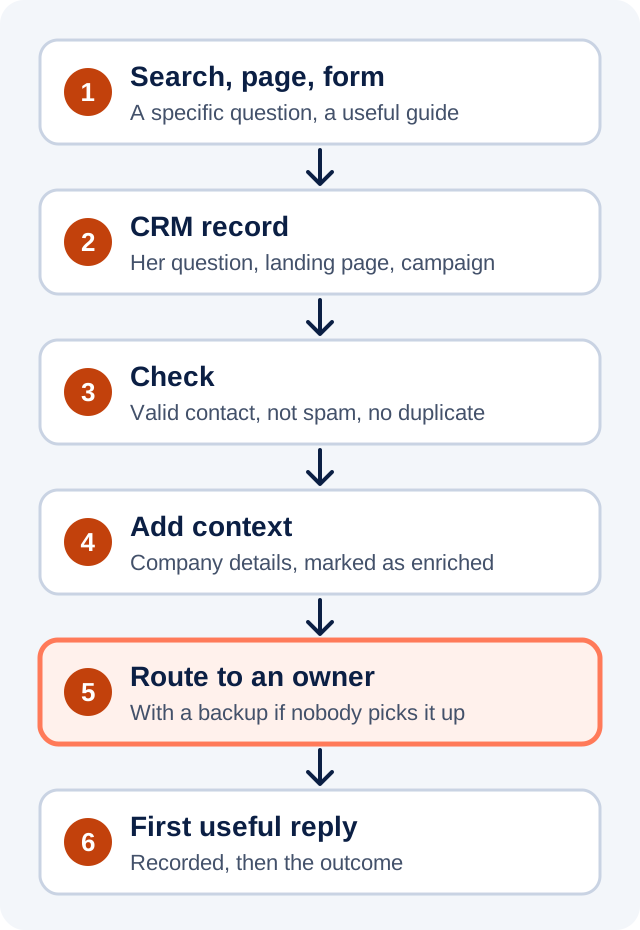
1. Create or update the CRM record right away
The moment she submits the form, the CRM should hold her inquiry: her exact question, the page she landed on, and any campaign or referral information you have. Don't summarize her question into a dropdown. "Eight years of deals and notes" is the most useful sentence in the record.
2. Check that the inquiry is usable
Confirm the email and phone number look valid, screen out obvious spam, and check whether she or her company is already in your CRM. If her company is an existing customer, the account owner needs to know before anyone else calls.
Decide in plain business terms what makes a lead qualified, and write it down. For example: a real company, a project you actually do, and a timeframe within the next few months. If your team can't agree on the definition, your reports won't agree either.
3. Add context, without holding her up
Approved data services can add details she didn't type, like company size or industry. Keep two things straight. First, mark which details she gave you and which came from enrichment, so nobody treats a guess as a fact. Second, if the enrichment service is slow or down, route the inquiry with what you already have and fill in the rest later. Her question shouldn't wait on a lookup.
4. Send it to the person who can act on it
Route the inquiry in real time to whoever owns the account or can make the next decision. Send them her actual question and the context they need to answer it, not just a name and a phone number.
Then plan for the day that person is out. Give every inquiry a backup owner or an escalation path, so a lead nobody picks up doesn't sit there quietly.
5. Record the first useful reply, and what happened in the end
An automatic receipt is fine. It tells her the message arrived while your team prepares a real answer. But don't count it as the response. Track when a person first replied with something useful, and later, whether the inquiry became an opportunity and a sale.
Where AI search fits, and where it doesn't
I'd love to tell you which leads came from an AI answer. Usually you can't.
Google's own guidance says that when someone clicks through from Search, the referrer shows only the site they came from, and it "doesn't include the search query that the user entered" (Google Search Central). Search Console shows you which queries bring people to your site, in aggregate. Google's November 16 update to the Search Analytics API, for example, makes it easier to separate branded from non-branded searches in that reporting (Google Search Central). That's useful for understanding how people discover you.
It doesn't tell you what happened after one particular person got in touch. That's the CRM's job. Use search reporting to see which questions bring people in, and use the CRM to see which of those people became customers. Don't stitch the two together into a story about one lead unless your data actually supports it.
The scorecard
You don't need a dashboard with forty charts. Start with three numbers:
- Time to first useful response. From the form submission to a person's real reply, not the automatic receipt.
- Inquiries without follow-up. The share of inquiries nobody has answered. This one should be close to zero, and it's the one that hurts most.
- Qualified opportunities by source. The share of inquiries from each source that meet your written definition of qualified.
Look at them by source and by team, every week. If one source brings fewer inquiries but more qualified opportunities, that's where I'd look before cutting its budget.
One warning. These numbers are only as good as the records behind them. If inquiries get handled by email outside the CRM, or reps skip the outcome field, the scorecard will look precise and still be wrong. Fixing the records comes first.
Submit your own form
In Before You Buy ChatGPT Ads, Click Your Own Ad, I suggested following your own ad to see where it leads. Do the same here. Submit your own estimate form with a specific question, and time what happens. Who gets it? How long until a person replies? Do they answer your question, or ask you to repeat it?
Your marketing earned that buyer's trust before they ever filled in the form. The follow-up is where you keep it.
If you'd like help connecting the pieces, this is the work behind PreciseMP's Digital Marketing & Growth and AI & Intelligent Automation services.